
Planning & Dispatch
Stop Scrambling When Drivers Fall Out Last Minute.
A driver calls out at 5 AM. A truck won’t start. A load gets added with no notice. In most operations, that’s when the phones start ringing and the schedule falls apart. T3 lets you plan a full week ahead, see who’s actually available, and reassign in seconds — without rebuilding anything.
One dispatcher planned a full week of shifts across multiple contracts in a single session — then covered a same-day driver call-out with a drag-and-drop, before the load ever left the yard.
The Problem
Coverage Gaps Don't Announce Themselves — They Just Cost You.
It’s not poor planning. It’s that most tools make you rebuild the schedule every time something changes.
The plan lives in someone's head
When the person who knows the routes is out, so is the plan. There’s no shared, week-at-a-glance view of who’s running what — so every change becomes a phone call.
You can't see who's actually free
Reassigning a load means guessing which driver has room. Without visibility into each driver’s existing workload, you either overload your best people or leave loads uncovered.
One change breaks the whole schedule
Move a driver in most systems and you lose the context around them — the route, the times, the downstream stops. Reassignment turns into re-planning, and unassigned loads slip through uncovered.
How T3 Solves It
Plan the Week, Cover the Gaps, and Dispatch — All in One Flow.
T3 turns planning and dispatch into one connected workflow. Build the schedule, get AI-ranked driver suggestions, auto-dispatch to your GPS provider, and reassign on the fly — the schedule context travels with every change.
AI-Powered Driver Suggestions
T3 automatically ranks the best-fit driver for every open load based on availability, route history, and current workload — so coverage decisions take seconds, not guesswork.
Weekly Dispatch Calendar
See your full week of runs on one calendar view. Each driver’s schedule shows as blocks across the week, so workload and availability are obvious at a glance.
Automated Load Generation
T3 auto-generates your recurring loads from existing routes every week, three weeks out — so your schedule starts populated, not empty.
Alternate Driver Planning
Drag a route onto the planning timeline and T3 highlights which drivers are available for it. Pre-assign coverage before a load ever departs — so a call-out is a swap, not a scramble.
What You See
Your Whole Week, One Calendar View — Drag to Reassign.
Every open route and every driver’s workload, in one screen — so you always know exactly who has room before you assign anything.
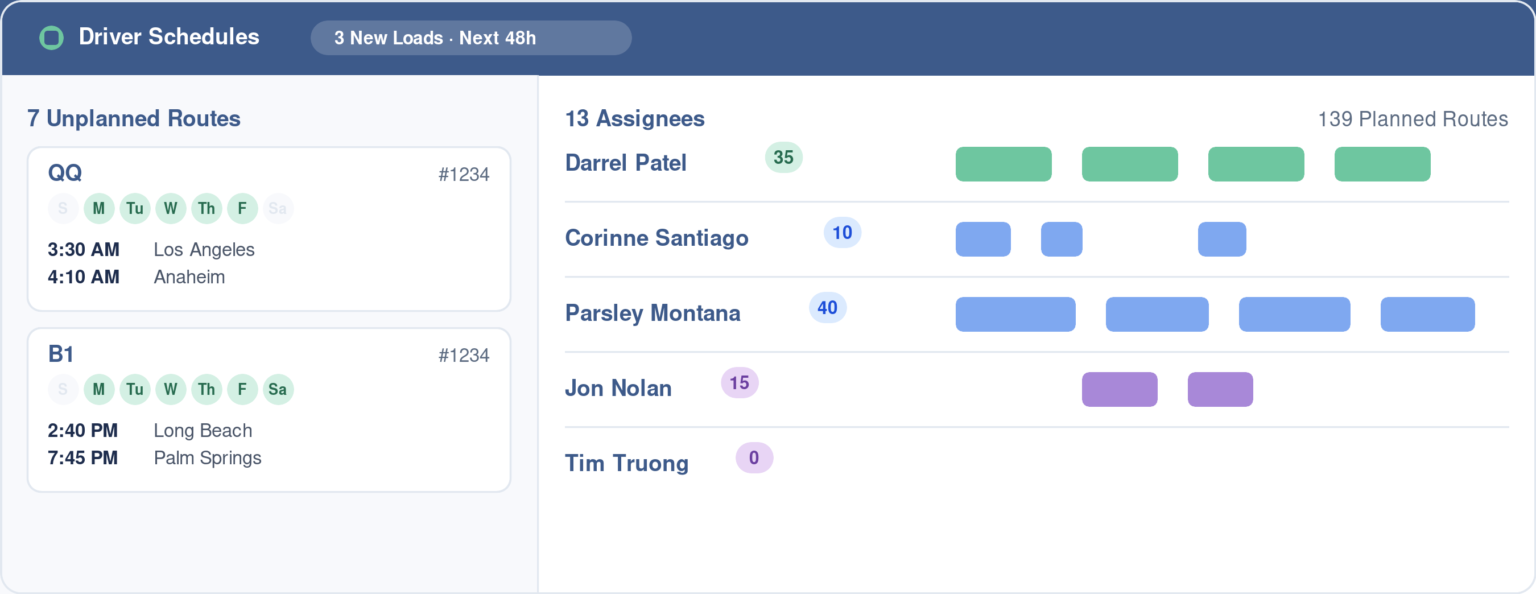
Screenshot of the T3 Driver Schedules screen. On the left, a list of unplanned routes waiting to be assigned, each showing its active days and stop times. On the right, a list of drivers with their route counts and colored blocks showing how their assigned routes are distributed across the coming weeks.
How It Works
From Empty Week to Fully Dispatched in Four Steps.
01
Generate your week of loads
Auto-generate recurring loads from your existing routes for the upcoming week, or add a one-off extra load. Everything lands ready to assign.
02
Plan and assign by shift
Drag routes onto the planning timeline — T3 highlights available drivers automatically — or bulk-assign up to a week of shifts to drivers and units at once.
03
Dispatch happens automatically
Once a trip is planned, T3 sends it to your GPS provider and activates live tracking on its own — arrival and departure times start flowing in without you lifting a finger.
04
Reassign when reality changes
Driver out? Truck down? Open the weekly view, drag the trip to an available driver — or reassign the whole schedule in bulk — and save. The route, times, and stops stay intact.
Stop Scrambling for Coverage.
Plan a full week ahead and reassign in seconds — without losing schedule context.